Roles
Product Manager |

A Product Manager oversees the development and success of a product. They define the product strategy, prioritize features, and collaborate with cross-functional teams to ensure the product meets user needs and business goals. They also analyze market trends, gather customer feedback, and make data-driven decisions throughout the product lifecycle.
Product Owner |

A Product Owner works closely with the development team in Agile methodologies. They prioritize the product backlog, define user stories, and provide detailed guidance on features. Product Owners represent the voice of the customer, ensuring that the development team delivers value and meets user expectations. They collaborate with stakeholders and communicate priorities to achieve the product's goals.
UX Strategy |

Strategic design requires incubation. We use this process to develop user-centric, innovative, value driven and feasible ideas to gain “approval to proceed”, kick-off teams, and begin development using a design thinking framework and a cross-functional team structure.
We achieve this by:
- Aligns vision and shared purpose across teams (Incubation workshops)
- Deepens understanding of our user/customers via strategic insight/foresight (Journey mapping, service blueprints, competitive analysis)
- De-risks solution adoption through problem definition
- Proactive decision-making vs. reactive
- Higher speed to market with initial concepting work
- Maps back to our business objectives and value proposition
- Creates desirable products that are profitable and sustainable over their lifecycle
UX Research |

User-Centred Design Requires User Research
Our research tells customer data stories to ensure our products are compelling and deliver great outcomes.
We achieve this by:
- Conducting rapid customer research
- Uncovering the ‘why’ behind the insights from our analytics
- Combining qualitative & quantitative for holistic insights
- Uncovering emotions & motivations of our customers
- Embrace conditions customers use our digital products in (store, car, garage)
- Remove geographical & in-person research constraints
- Observe customers in their habitat, using their devices
Visit the UXR sharepoint site
- UX Research Reports
- In-Progress Research
- Request Research Form
- Featured Research Reports
Please reach out to Steve McGuire, Mgr UX Research with any questions regarding UXR
UX Design |

We design products that provide meaningful and relevant experiences for our customers.
We achieve this by:
Gaining a better understanding of the business needs and our customers (Stakeholder interviews, user research, persona creation)
Facilitating ideation sessions
Asking questions and listening (to stakeholders and customers)
Creating user flows and journey maps
Wireframing (Lo-Fi & Hi-Fi designs) and prototyping
Reuse components where applicable
Validating designs with customers with research (UXR)
Designing inclusively (Accessibility top of mind)
Iterating on ideas
Working closely with FED, eComm, Creative Content Team
Reviewing our designs with partners and stakeholders for feedback
UX Design |

We design accessible interactions and components within our Design System leading to customer satisfaction.
We achieve this by:
Facilitating ideation sessions
Asking questions and listening (to stakeholders, UX designers, and customers)
Mock-ups (Hi-Fi designs) and prototyping
Reuse components where applicable (Design system)
Validating designs with customers with research (UXR)
Designing inclusively (Accessibility top of mind)
Iterating on ideas
Working closely with FED, eComm, Creative Content Team
Reviewing our designs with partners and stakeholders for feedback
How UX/UI will Triage Merchandising Requests
UX Design will triage new UX/UI requests quickly without AVPs. They will propose components and layouts to solve new UX requests.
Based on the changes required, they will gather requirements as needed.
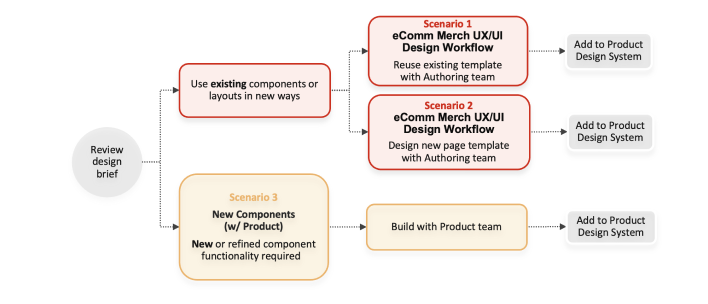
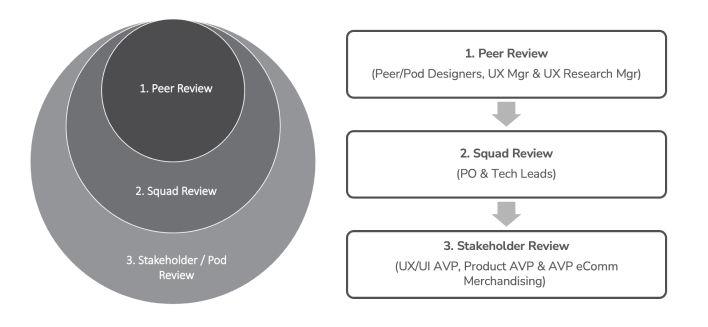
UX Product Design Review Process
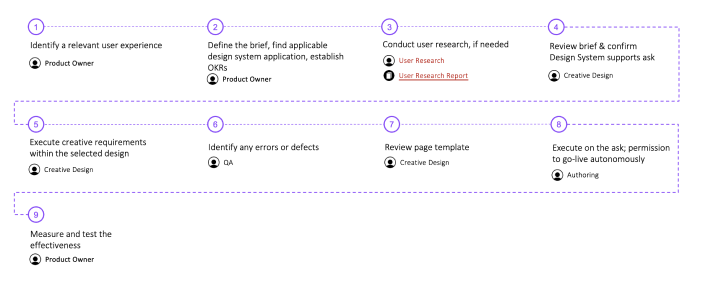
Scenario 1 UX/UI Design Workflow for reuse of existing template and components
When to use: BAU project follows all the rules and uses components the way defined by the Design System.
Who is involved: eComm, Creative, Authoring, QA, Measure, UX Research (when needed)
Scenario 2 UX/UI Design Workflow for create a new template with existing components
When to use: Exploring new UX patterns, using existing components to create new templates (with UX/UI support & reviews).
Who is involved: eComm, Creative, Authoring, QA, Measure, UX Research (when needed), UX, UI
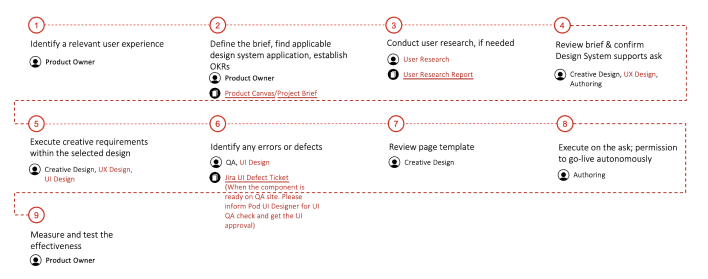
Scenario 3 UX/UI Design Workflow for New Components (w/ Product)
When to use: New or refined component project where UX & UI Design work with the Product team to deliver new components for our Product Design System. The product team and backend development to deliver new components for our Product Design System.
