
About DCX
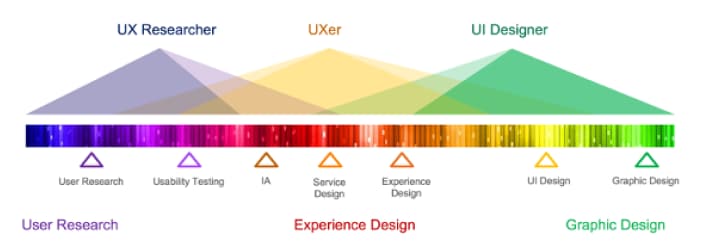
DCX UX & UI Design Spectrum
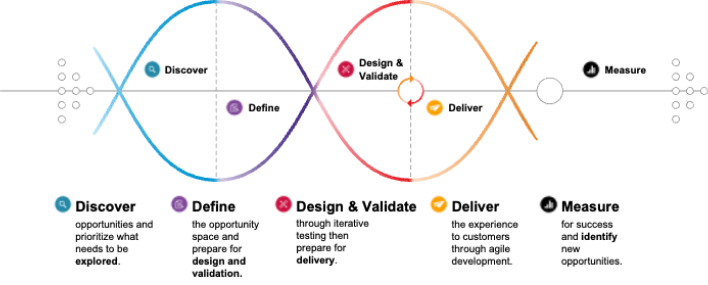
DCX Design Framework
UX Research
User-centered Design Requires User Research
Our research tells customer data stories to ensure our products are compelling and deliver great outcomes.
We achieve this by:
Conducting rapid customer research
Uncovering the ‘why’ behind the insights from our analytics
Combining qualitative & quantitative for holistic insights
Uncovering the emotions & motivations of our customers
Embrace conditions customers use our digital products in (store, car, garage)
Remove geographical & in-person research constraints
Observe customers in their habitat, using their devices
Visit the UXR SharePoint site
UX Research Reports
In-Progress Research
Request Research Form
Featured Research Reports
Please reach out to Steve McGuire, Mgr UX Research with any questions regarding UXR
UX Design
We design products that provide meaningful and relevant experiences for our customers.
We achieve this by:
Gaining a better understanding of the business needs and our customers (Stakeholder interviews, user research, persona creation)
Facilitating ideation sessions
Asking questions and listening (to stakeholders and customers)
Creating user flows and journey maps
Wireframing (Lo-Fi & Hi-Fi designs) and prototyping
Reuse components where applicable
Validating designs with customers with research (UXR)
Designing inclusively (Accessibility top of mind)
Iterating on ideas
Working closely with FED, eComm, Creative Content Team
Reviewing our designs with partners and stakeholders for feedback
UI Design
We design accessible interactions and components within our Design System leading to customer satisfaction.
We achieve this by:
Facilitating ideation sessions
Asking questions and listening (to stakeholders, UX designers, and customers)
Mock-ups (Hi-Fi designs) and prototyping
Reuse components where applicable (Design system)
Validating designs with customers with research (UXR)
Designing inclusively (Accessibility top of mind)
Iterating on ideas
Working closely with FED, eComm, Creative Content Team
Reviewing our designs with partners and stakeholders for feedback
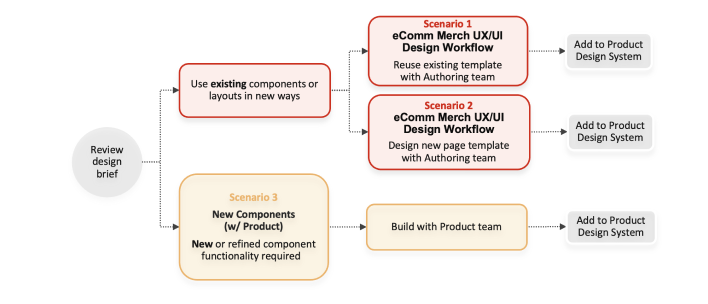
How UX/UI will Triage Merchandising Requests
UX Design will triage new UX/UI requests quickly without AVPs. They will propose components and layouts to solve new UX requests.
Based on the changes required, they will gather requirements as needed.
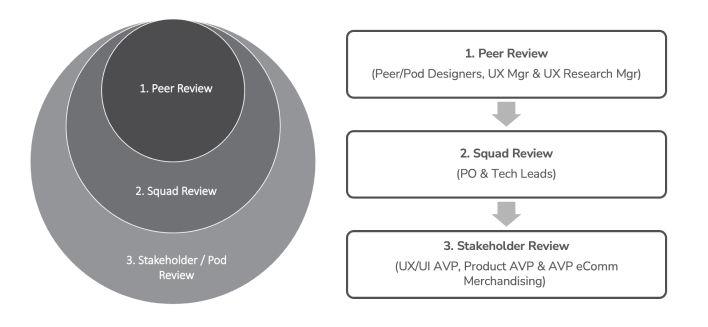
UX Product Design Review Process
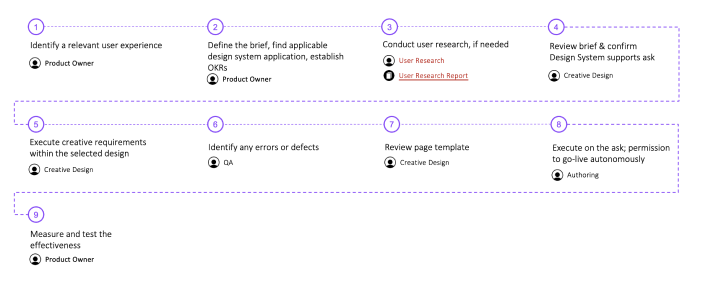
Scenario 1 UX/UI Design Workflow for reuse of existing template and components
When to use: BAU project follows all the rules and uses components the way defined by the Design System.
Who is involved: eComm, Creative, Authoring, QA, Measure, UX Research (when needed)
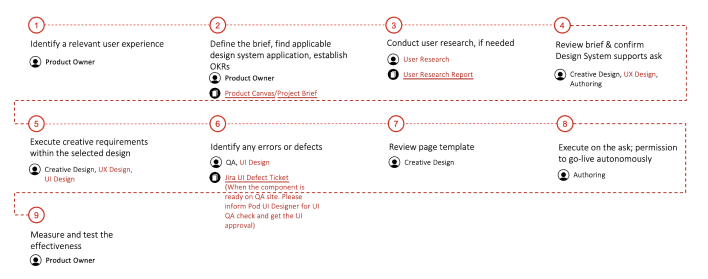
Scenario 2 UX/UI Design Workflow for create a new template with existing components
When to use: Exploring new UX patterns, using existing components to create new templates (with UX/UI support & reviews).
Who is involved: eComm, Creative, Authoring, QA, Measure, UX Research (when needed), UX, UI
Scenario 3 UX/UI Design Workflow for New Components (w/ Product)
When to use: New or refined component project where UX & UI Design work with the Product team to deliver new components for our Product Design System. The product team and backend development to deliver new components for our Product Design System.
