
Chek Box Frame
Overview
The Chek Box Frame adds a strong sense of brand and is used to frame images. It can add a pop of brand colour.
Look for opportunities to close crop content of an image and bleed it onto the Chek Box Frame to add an engaging pop-out effect.
The Chek Box Frame is an even square. It can bleed out of the layout on one side, but a minimum of three sides of the frame should always be visible in the design.
The Chek Box Frame edge should never touch the sides of a layout with the exception of a square format. However, the Chek Box Frame can touch a maximum of two sides for layouts which have a greater than 4:1 ratio, ie. Leaderboard. For all other instances use the minimum distance from edge of layout rule.
Never place text/content on the Chek Box Frame itself.
Formats
The Chek Box Frame can be used on any vertical, horizontal or square format.
Special care must be taken to establish the appropriate thickness of the Chek Box Frame for each format.
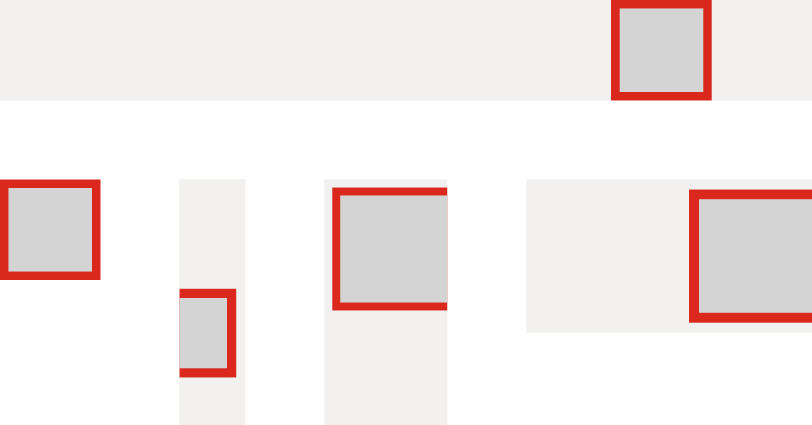
Chek Box Frame thickness
General rules have been established to achieve the desired thickness of the Frame and are to be considered a starting point. Small variances are allowed once content for the Frame and layout is established. The relationship of the Frame and its content on the layout is established by its purpose, being a supportive element to add brand impact.
Determining Frame thickness and minimum distance from the Frame to the edge of a layout
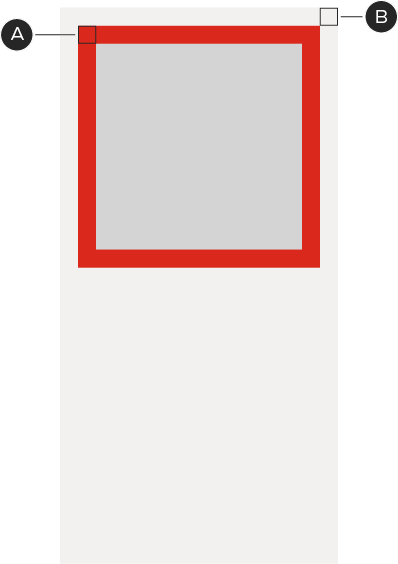

A – Represents the thickness of the Frame. (A) is equal to a specific percentage of the layout's shortest side.
B – Represents the minimum distance from the Frame to the edge of a layout. (B) is equal to a specific percentage of the layout's shortest side.
(A) and (B) are the same percentage for all layouts.
The minimum distance should be maintained for all frame sides except those that bleed off the edge of a layout. Refer to exceptions outlined in overview.
Calculation example, for a 300×600px layout, the shortest side being 300px:
A – 300px × 7.5% = 22.5px – the Frame thickness.
B – 300px × 7.5% = 22.5px – the minimum distance to the edge.
Underneath each of the following layout formats, percentages are assigned to calculate the Frame thickness and minimum distance to the edge.
Vertical layouts
Thickness for Frames that are smaller than the width of a layout

A – Frame thickness is 6.5% for layouts with a 2:1 ratio or less.
B – Frame thickness is 8.5% for layouts with a greater than 2:1 ratio.
Thickness for Frames that are larger than the width of a layout

A – Frame thickness is 6.5% for layouts with a 2:1 ratio or less.
B – Frame thickness is 10.5% for layouts with a greater than 2:1 ratio.
Thickness for Frames that are equal to or less than half the width of a layout

A – Frame thickness is 5% for layouts with a 2:1 ratio or less.
Note: It is not recommended to use Frames less than half the width of a layout with a greater than 2:1 ratio.
Horizontal layouts
Thickness for Frames that are smaller than and equal to the height of a layout
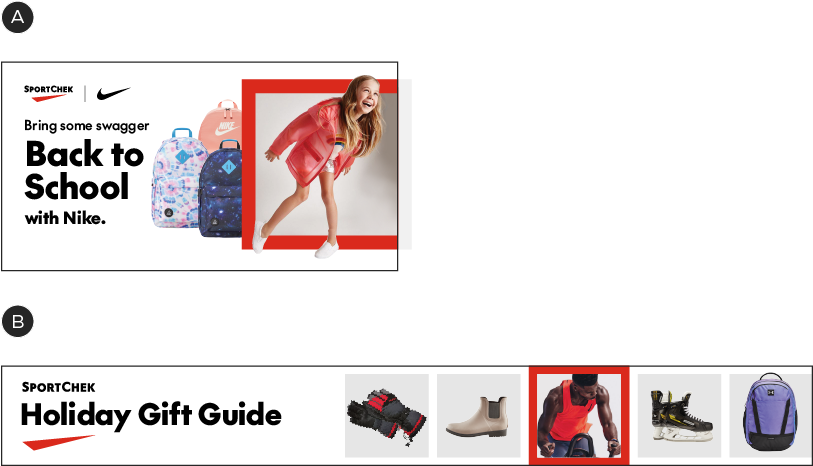
A – Frame thickness is 6.5% for layouts with a 3:1 ratio or less.
B – Frame thickness is 8.5% for layouts with a greater than 3:1 ratio.
Note: It is not recommended to use Frames less than half the height of a layout that has a greater than 2:1 ratio.
Thickness for Frames that are smaller than and equal to the height of a layout
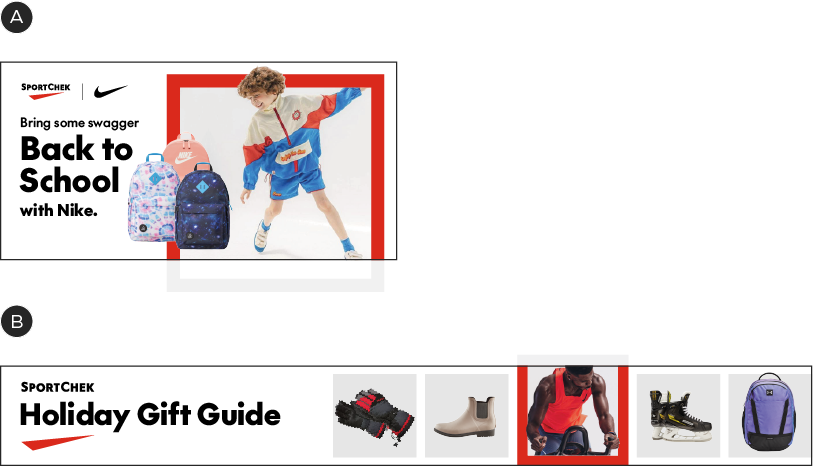
A – Frame thickness is 6.5% for layouts with a 3:1 ratio or less.
B – Frame thickness is 10.5% for layouts with a greater than 3:1 ratio.
Thickness for Frames that are equal to or less than half the height of the layout

A – Frame thickness is 5% for layouts with a 2:1 ratio or less.
Square layouts
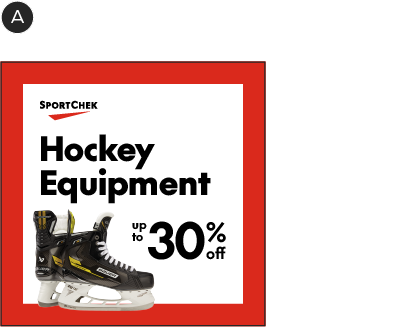
Thickness for Frames that are equal to the size the layout
A – Frame thickness is 8.5%.
B – Frame thickness is 6.5%.
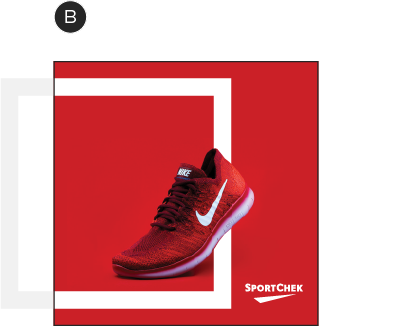
Thickness for Frames that are smaller than the layout
Thickness for Frames that are equal to or less than half the width of the layout

A – Frame thickness is 3%.
This applies to both Frames that bleed and those that do not.
Chek Box Frame violations
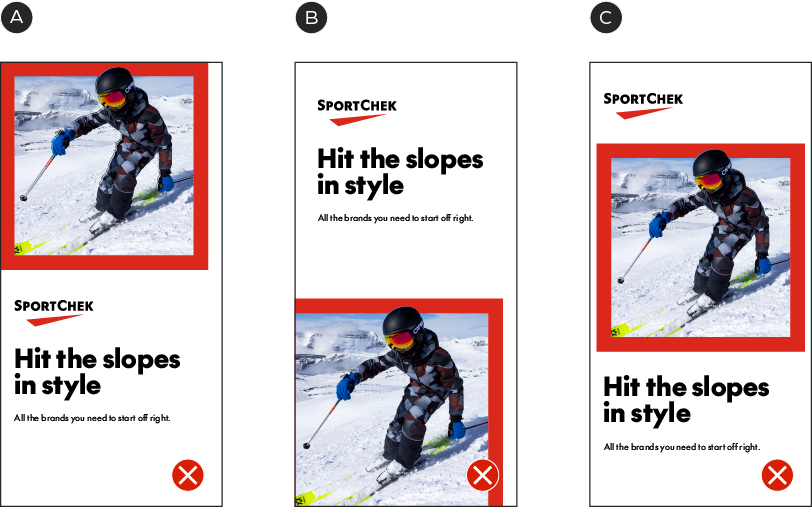
A – Never touch the Chek Frame Box to the edge of a layout.
B – Never show less than three sides of the Chek Box Frame.
C – Never intrude on the minimum distance from the Chek Box Frame to the edge of a layout.

D – Never place text on a Chek Box Frame.
E – Never use the Chek Box Frame to contain text.
F – Never use more than one Chek Box Frame in a layout.