

Updates include the new hierarchy of the Lockup Zone by promotional tier.
Flyer Zone System
The Flyer Zone System is the foundation that all Flyers are built on. Living within the Flyer grid, a variety of elements make up the Flyer, each with their own rules and guidelines. Of these elements, some will appear on every Flyer whereas others are optional. These elements live in zones that can be combined in numerous ways to create a wide variety of unique Flyers. The zones that make up this system are the Header (Sales Dates & Whisper), Logo, Lockup, NPP, Deal Zone, feature product/product, basebar and legal, flaps, wraps and POPs.
Front Cover Zones
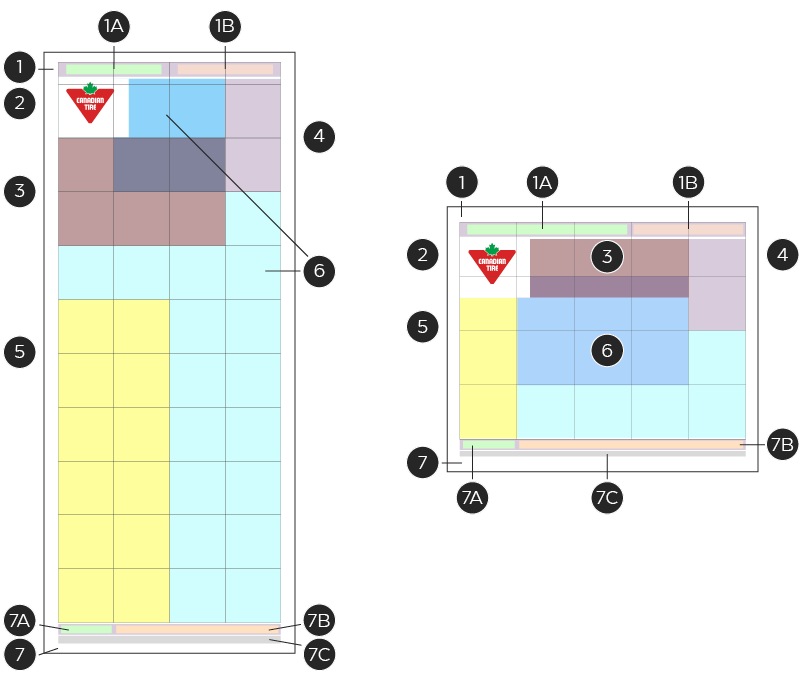
1. Header (required):
The header zone is located in at the top of the grid and contains the sales date zone and the whisper zone. This zone is required on all Flyer front covers and has a fixed size and position. For more information on this zone, please see the Header, footer & legal page.
1A. Sales dates (required):
The sales dates zone is located in a fixed position within the header and is full width and left-aligned. When required, the width can be adjusted to accommodate a whisper zone. For more information on this zone, please see the Header, footer & legal page.
1B. Whisper (optional):
The whisper zone is located within the header zone and has an adjustable width and is right-aligned. Though adjustable, the width of this zone should not extend beyond half the page in width. This area contains messaging related to holidays/special occasions. For more information on this zone, please see the Header, footer & legal page.
2. Logo (required):
Located in a fixed position in the upper left corner of the Flyer, the logo zone must appear on all Flyer front covers. This zone can contain the Canadian Tire Brandmark or a Brand Signature. The element placed within this zone is determined by the strategic goals of the flyer and must follow all guidelines which relate to that element. In additional to the inherent guidelines, the logo zone also has its own set of in-channel guidelines designed to create consistency across all Flyers. For more information on this zone, please see the Brandmark, Triangle and lockup placement page.
3. Lockup (required):
Located below or beside the logo zone, the lockup zone contains an event lockup or Brand Signature. This zone is flexible in height and width, but cannot extend past three grid units wide, with limited exceptions. The lockup that is to be used is determined by the Flyer Tier. For more information of the Flyer Tier System, please see the Promotional Events page. When a lockup and Brand Signature are both required on a front cover, the secondary message must move into the basebar's signature zone. For more information on the lockup zone, please see the Brandmark, Triangle and lockup placement page.
4. Non-product promotion (NPP) (optional):
The NPP zone is a flexible message slot with a primary vertical position in the top right and can vary in size, up to a maximum 5 grid units. An NPP is typically a Triangle-related loyalty message but can contain special event or category promotion. For more information on this zone, please see the Zone & NPP (messaging slots) page.
5. Deal Zone (optional):
The Deal Zone is a dedicated area of the Flyer that contains product that are typically identified as the best deals in the Flyer. A deal zone can appear across multiple tiers and on the front cover and/or inside spreads of a Flyer. The front cover Deal Zone is commonly seen in tiers 1, 2 and 4. In Narrow Broad formats, it can appear left or right aligned, with a minimum of 1 grid unit appearing above the fold. It should be placed with the position of the portal in mind. In Square Tab, the Deal Zone can appear vertically in the first or last column or horizontally the bottom row, either left or right aligned when an NPP also appears on the cover. For more information on this zone, please see the Zone & NPP (messaging slots) page.
6. Feature product/product (required):
The product zone makes up the bulk of the Flyer. It appears on all pages and can free-flow around all other elements. Feature product and product zones are identical in structure, but differ in size. The feature product zone is optional but is reserved for the priority product on the page. The overlap between the lockup and the feature product is to allow for size flexibility of both elements but avoid overlapping a product image and lockup when possible. Due to the amount of information found within a product slot, the information is further broken down into its own specific set of zones. For more information on this zone, please see the Product slots page.
7. Footer (required):
The footer zone is location at the bottom of every page and contains information such as a Brand Signature, basebar message, legal and page number. Footers must appear on all pages, but see slight variances in which content is contained based on which page is it on. For more information on this zone, please see the Header, footer & legal page.
7A. Signature (optional):
The signature zone is a front cover specific zone and is on the left side of the footer zone. It contains a secondary message or Brand Signature and is commonly seen during event weeks or in Flyer utilizing an Omni-identity, but can be used on any front cover. For more information on this zone, please see the Header, footer & legal page.
7B. Basebar message (required):
Located at the bottom of every page, the basebar message zone contains a message from a CTR Owned Brand or service or an external brand. The messaging can vary page to page and can be custom to each Flyer or from a pre-determined set of basebar messages. When this zone contains an external brand message, it can maintain its own unique branding but must follow the foundational footer zone guidelines. For more information on this zone, please see the Header, footer & legal page.
7C. Legal: Required
Located at the very bottom of the page, beneath the footer, this zone contains all legal disclaimers that have not been placed in-slot. Legal can take up to 3 lines of space. For more information on this zone, please see the Header, footer & legal page.
Special Zones & Formats
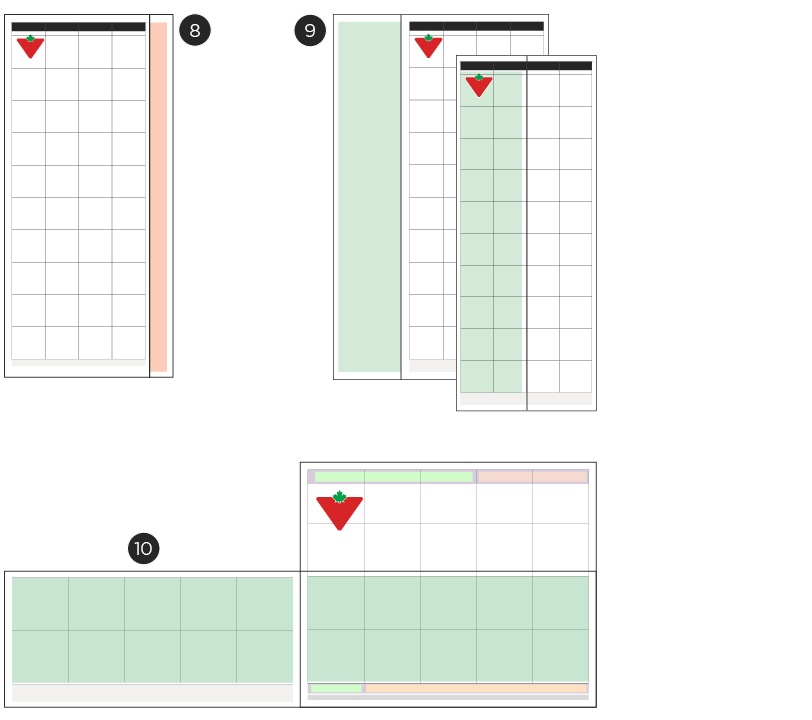
8. Pop-out (optional):
Pop-outs are Flyer pages that are inserted into a Square Tab or Narrow Broad Flyer. These inserts follow all existing Zone and Design System Guidelines and have additional width or are off-set when placed into the Flyer so that the pop-out zone is visible when inserted into the Flyer. The pop-out typically contains the lockup and can be located across the top or down the side of a page, depending on the page format. For more information on this zone, please see the Special zones & formats page.
9. Flaps (optional):
Flaps are half page, double-sided additions to the Flyer that appear on the front covers of Narrow Broad Flyers that allow for additional product/messaging. Flaps always appear on the left side of the front cover and are glued or stapled to the seam, along with all other pages. The logo and lockup can appear on both the flap and cover in the same position for seamless integration when closed, or the they can shift and appear in the two right side columns so they are visible when the flap is closed. In this instance, the logo and lockup would not repeat on the Flyer. For more information on this zone, please see the Special zones & formats page.
10. Wraps (optional):
Wraps are additional loose Flyer pages that wrap around the front and back covers of flyers to allow for additional product space/messaging. The can come in half- or full-page formats and are not attached to the main Flyer. Vertical half-page wraps follow the same logo and lockup rules as a flap (see above) but can also appear as a bottom aligned, horizontal half-page format. In this version, the logo and lockup must maintain the standard placement. For more information on this zone, please see the Special zones & formats page.

Interior spreads of the Flyer utilize many of the same zones as the front cover, but some have some additional elements and/or restrictions when placed on an interior page.
A - Header (optional):
Headers can appear on lead and core Flyer pages. On interior spreads, headers can contain headlines and be formatted to run across an entire page, spread or to appear in slot. Each of these styles of headers have unique guidelines. Please refer to the Header, footer & legal page for spec details.
B - Headlines (optional):
Headlines are optional elements within the header zone that apply to the entire page or spread. They can fit both in-slot and full-spread headers and should be limited to one message per page. Headlines can include plain text, lockups or a combination of the two. Please refer to the Header, footer & legal page for spec details.
C - Product slots (optional):
Product slots are a required zone that make up the bulk of the Flyer pages. This zone can be broken down into a series of smaller slots that vary in size. Each slot has a set of elements which are further broken down into their own zones. For detailed information on these slots, please see the Product slot page.
D - Deal zone (optional):
Some Flyers contain Deal Zones in interior pages. These can range from entire spreads to single slots. These slots and/or sections function the same as the deal zones found on the front cover. For more information on this zone, please see the Zone & NPP (messaging slots) page.
E - Footer (optional):
The footer zone is a required element on all pages in a Flyer. On interior pages, this zone contains a page number, base bar message and legal copy. All three elements are required on each page. For more information on this zone, please see the Header, footer & legal page.
F - Page Number (optional):
The page number element appears on the outer edges of each footer zone. Depending on which side of the spread the page appears determines the alignment of the page number zone. Front and back covers are the only pages which do not feature a page number. For more information on this zone, please see the Header, footer & legal page.
G - Base bar Message (optional):
The basebar message element appears on all pages and contains messaging as determined by the business. These messages can be custom to the individual Flyer or selection from the pre-determined library. The messages in this zone can be CTR owned brand or service messages, or a non-CTR owned message from an external brand. Non-CTR Owned basebars will retain their own branding but must hall within the foundational base bar message guidelines. For more information on this zone, please see the Header, footer & legal page.
H - Legal (optional):
The legal element appears at the bottom of every page underneath the footer zone. The legal element spans across the width of the entire page and can contain a variety of legal messaging as needed. Legal in this zone cannot exceed three lines of copy. For more information on this zone, please see the Header, footer & legal page.
Integration with Digital Flyer
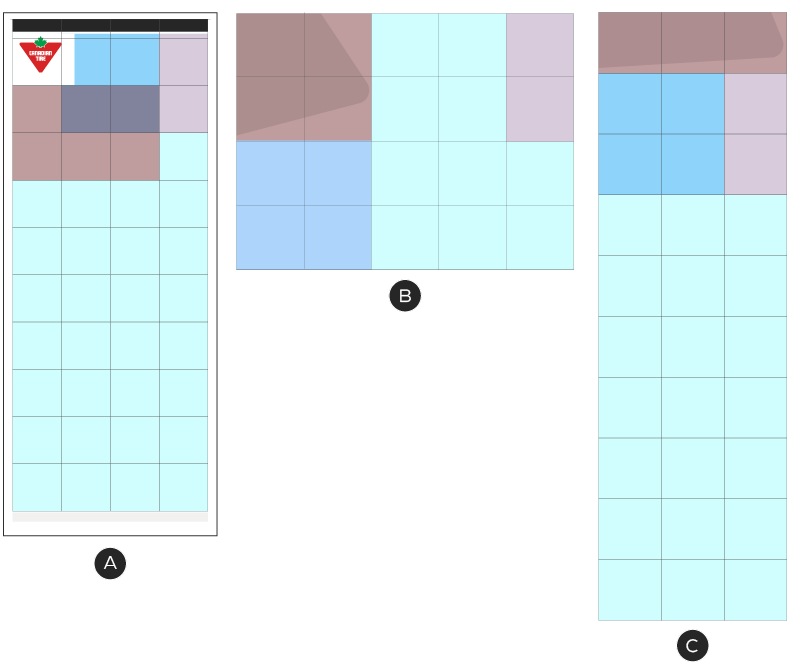
A - Print Flyer
B - Desktop view
C - Mobile view
The Zone system maintains the same formatting in order to create a consistent experience for our customers, regardless of which channel they're interacting with it. No zone may extend beyond three grid units due to the limitations of the mobile view.
Zone Combinations
In an effort to create a stronger visual heirarchy between flyers, the Lockup Zone's location and scale will be dictated by the promotional tier. Visit the Promotional Tiers page for more information on the different tier's visual identities.
Tier 1
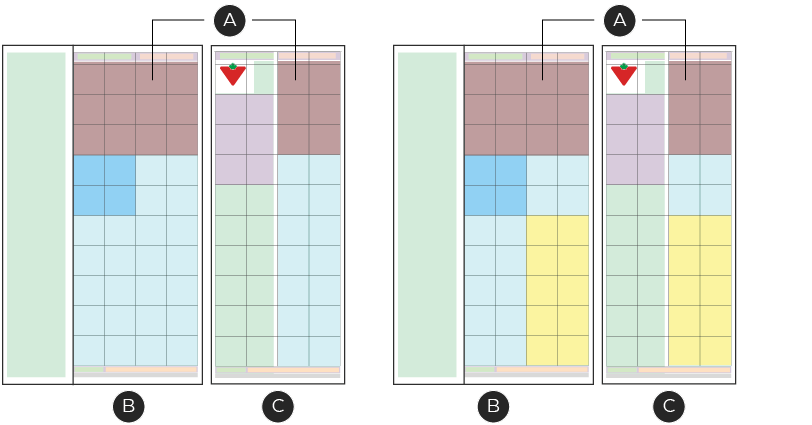
A – Lockup Zone
B – Flyer with flap open
C – Flyer with flap closed
Tier 1 flyers are our biggest promotions of the year and heavily rely on strong branding to communicate the level of importance. The Lockup Zone on tier 1 flyers must appear at the top of the flyer and span the entire width of the grid, with the exception of if there's an NPP zone.
Tier 2
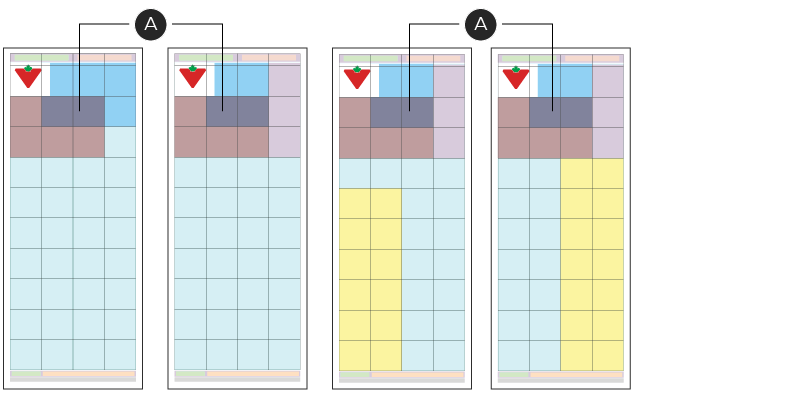
A – Lockup Zone
Tier 2 flyers are our second largest promotions of the year. These events have smaller Lockup zones that must appear below the CT Brandmark to create a hierarchy between tier 1 and 2 events.
Note: Tier 2C Tire Sale may occasionally need to break this rule as it can be limited by the size of paper that it is printed on. In these instances, the Tier 2C promotional events may follow the zone construction of a Tier 3 flyer. When possible, ensure the Lockup Zone matches that of the other Tier 2 flyers.
Tier 3A & 3B
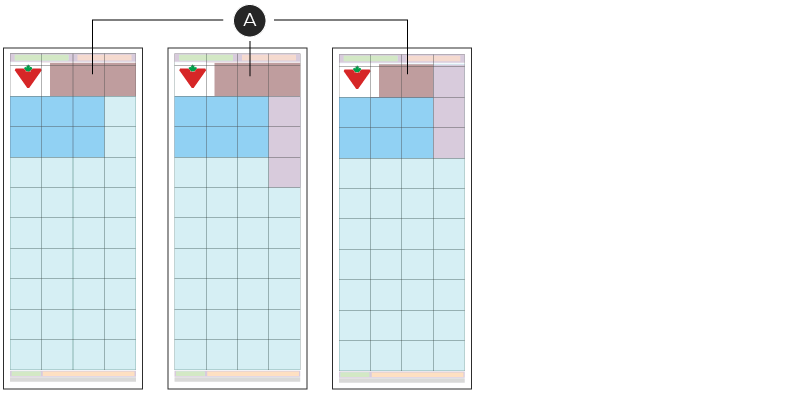
A – Lockup Zone
Tier 3 flyers are the smallest of the named promotional events that we run. These flyers are more densely packed with SKUs in the Product Zone and have smaller Lockup Zones that appear within a single grid unit to the right of the CT Brandmark.
Note: The design of the tier 3A and 3B lockups are different. For more information, see the Tier 3A and Tier 3B pages.
Tier 4
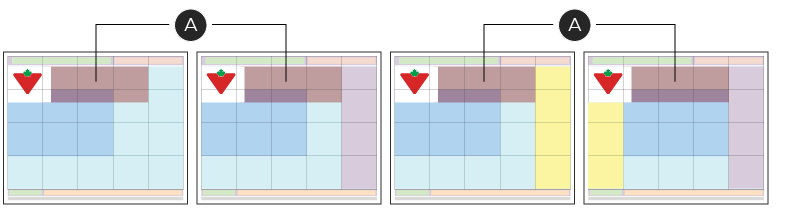
A – Lockup Zone
Tier 4 flyers are our standard everyday promotions. The Lockup Zone on these flyers contain a variation of a Brand Signature and must always appear within a single grid unit row to the right of the CT Brandmark.
Special zones & formats
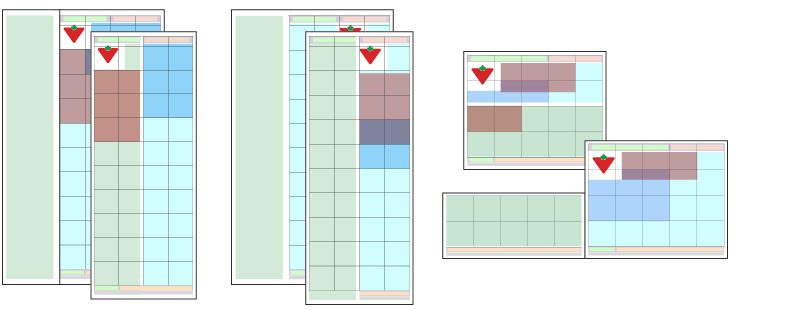
Grand Opening Flyer Zone System
The Canadian Tire Grand Opening Program follows the same zoning system as all other Flyers with the addition of a few unique program zones.
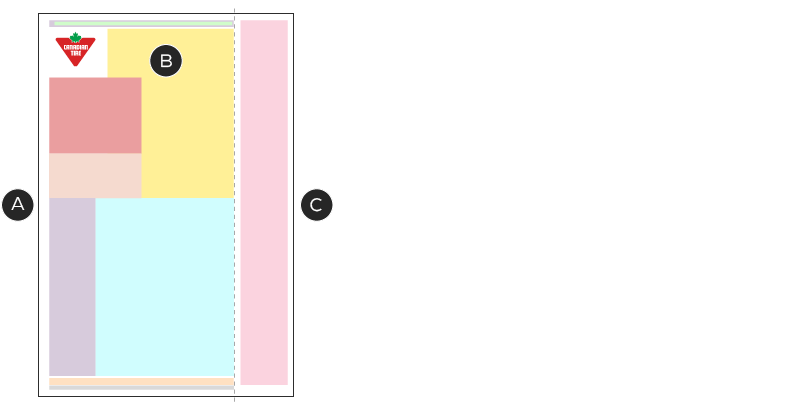
A - Map & address zone (required):
Due to the local nature of the Grand Opening Program, it's important for each Flyer to call out the location of the store and its operating hours. This slot should be featured prominently on the front cover and follow the same guidelines as seen in the NPP slots. For more detailed spec information on how to build the map & address zone, please see the Zone & NPP (messaging slots) page.
B - Deal Zones
Deal Zones in the Grand Opening Program function the same as all other deal zones. It is more common in this program to see more than one Deal Zone on a cover at the same time. It is important to note that these two zones must appear distinctly different from one another as they usually have different strategies. For more information on the visual identity of the Grand Opening Program, please see the Grand Opening Omni-identity page.
C - Ad flap (optional):
Grand Opening Program fliers can contain an Ad flap zone. This zone contains a set of messaging slots and is always located on the right hand side of the page and exists outside of the Flyer grid. This zone is a flap that folds under so that it sits between pages two and three.
This zone should follow the same vertical break points as the established main content grid on the front cover, making it a 1x8 grid unit column. Content placed within this zone must be a minimum of one grid unit in height, to a maximum of 4 grid units. Any CTR-Owned content must follow the rules set out in the NPP section. Any non-CTR Owned messaging can maintain its own branding (i.e., Triangle, Jumpstart) but must maintain the foundational guidelines set out in the NPP section. For more information on how to build these slots, please see the Zone & NPP (messaging slots) page.
Digital consideration:
When converted to the digital environment, the content within the ad flap zone will appear after all other content on the front cover, but before the page two content. With this in mind, the most important content should appear aligned the Flyer grid breaks for the best outcome in the digital space.
Recommended Grand Opening Flyer Zone Combinations
Due to the complexity of the Grand Opening Program and the variety of different information which can appear, there are established recommended zone combinations which have been optimized for the digital space.
Lockup beneath logo
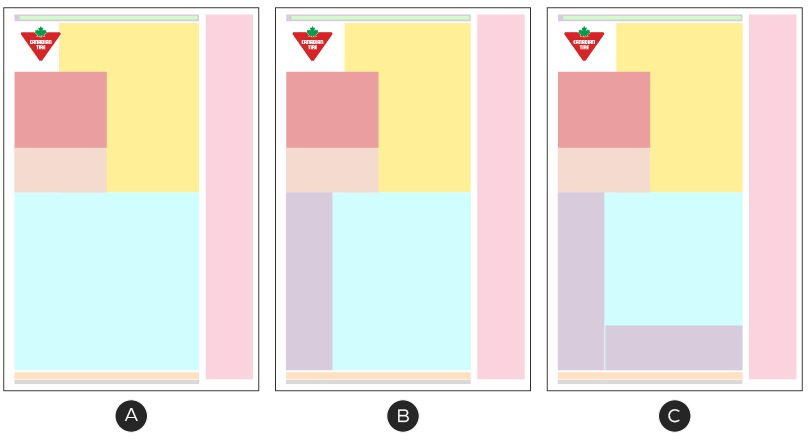
A - Lockup & store info zones
B - Lockup & store info zones + 1 NPP/messaging zone
C - Lockup & store info zones + 2 NPP/messaging zone
Lockup beside logo
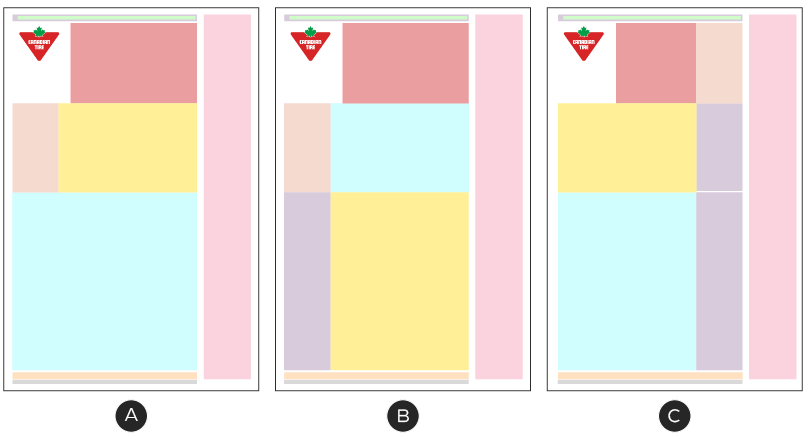
A - Lockup & store info zones
B - Lockup & store info zones + 1 NPP/messaging zone
C - Lockup & store info zones + 2 NPP/messaging zone