

Margins and Safe Zones
TV & YouTube
The recommended margins are 5% of the height of the layout (54px at 1920x1080), assuming a 16:9 aspect ratio. No copy, Brandmarks or legal should be placed outside these margins.

A – Margins – 5% of layout height
B – Safe area
9:16 universal safe zone
To streamline workflow for producing a single 9:16 video that works on all social media platforms and smartphone aspect ratios, we have developed a universal safe zone – using this will ensure that text and key visuals are completely visible for every user.
The following diagram describes the global safe zone, assuming a canvas size of 1080x1920 – adjust your own margins accordingly.
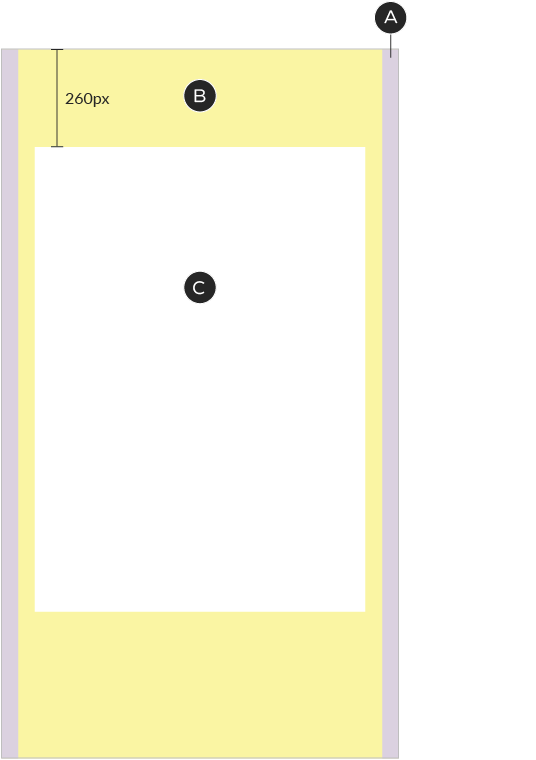
A – Margins – 48px wide (each). Keep all text and important graphics out of these areas
B – Graphic-safe area – 984px wide. Critical graphics must be contained within this area
C – Type-safe area – 896x1264px, horizontally-centered, 260px from top. Text, lockups and Brandmarks must sit within this area
Any type or graphics that sit outside their respective safe areas may be cut off or covered by the interface
Instagram & Facebook
Safe areas for Instagram & Facebook differ, depending on the type of unit you're building for – either Stories or Reels. In both cases, these guidelines assume an output size of 1080x1920 pixels.

Stories
A – Margins – 48px wide (each)
B – Graphic-safe area – 984px wide, horizontally-centered
C – Type-safe area – 896x1690px, horizontally-centered, 200px from top
Reels
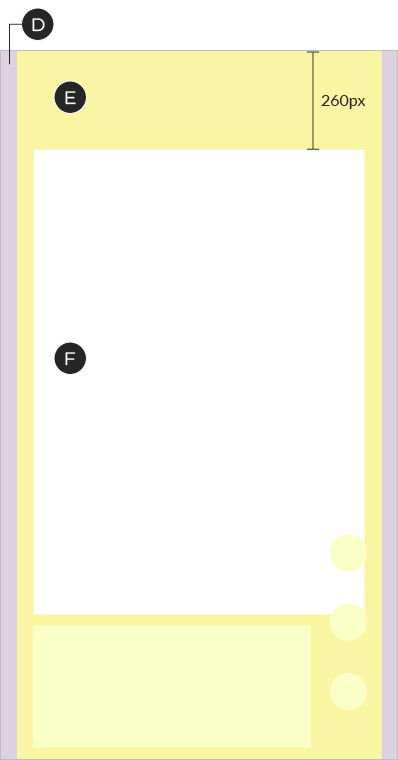
D – Margins – 48px wide (each)
E – Graphic-safe area – 984px wide, horizontally-centered
F – Type-safe area – 896x1264px, horizontally-centered, 260px from top. Note the position of the icons at the bottom right – there may be some overlap with your content
TikTok
For TikTok units, use the Global Safe Area. These guidelines assume an output size of 1080x1920 pixels.

A – Margins – 48px wide (each)
B – Graphic-safe area – 984px wide
C – Type-safe area – 896x1264px, horizontally-centered, 260px from top.
Note the position of the icons at the bottom right – there may be some overlap with your content
Snapchat
Safe areas for Snapchat differ, depending on the type of unit you're building for – Collections and Stories, or single video ads. In both cases, these guidelines assume an output size of 1080x1920 pixels.
Collections and Stories
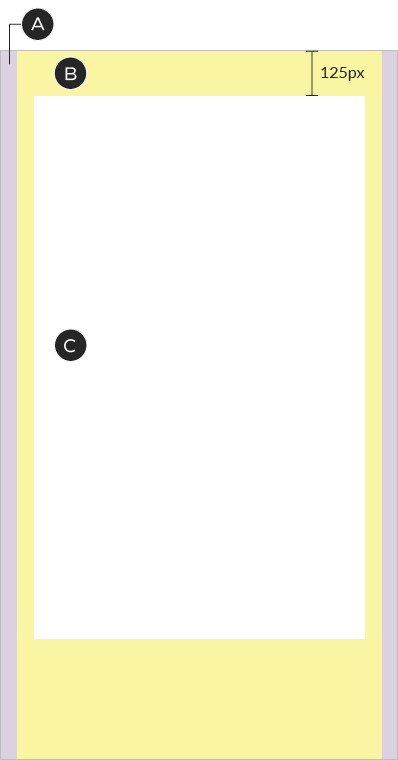
A – Margins – 48px wide (each)
B – Graphic-safe area – 984px wide, horizontally-centered
C – Type-safe area – 896x1465px, horizontally-centered, 125px from top
Single video ads
D – Margins – 48px wide (each)
E – Graphic-safe area – 984px wide, horizontally-centered
F – Type-safe area – 896x1670px, horizontally-centered, 200px from top