

Special zones & formats
Summary
Outside of the standard zones which we see in most Flyers, there is one additional type of zone and two formats which can be used. These zones and formats are commonly used throughout the year and are typically associated with extra promotional events running in addition to the standard Tier 4 Flyer. These three types of zones/formats are pop-outs, flaps and wraps.
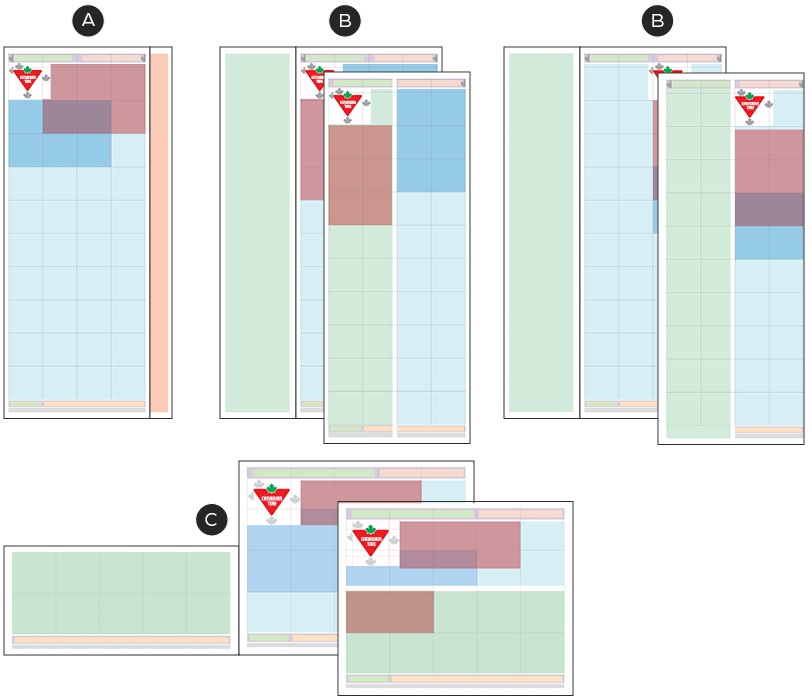
A - Pop-out zone (optional):
Pop-outs are a zone added to a standard Flyer page that is inserted into a Square Tab or Narrow Broad Flyer. These inserts follow all existing Zone and Design System Guidelines but have additional width or are off-set when placed into the Flyer so that the pop-out zone is visible when inserted into the Flyer. The pop-out zone typically contains the lockup and can be located across the top or down the side of a page.
B - Flaps:
Flaps are a half page, double-sided format bound to the Flyer front cover, allowing for additional product/messaging. A flap always appears on the left side of the front cover and is glued or stapled to the seam.
C - Wraps:
Wraps are Flyer format comprised of additional loose Flyer pages that wrap around the front and back covers of Flyer. They can be half- or full-page and are not attached to the main Flyer. Tiers 1-3 commonly use the wrap format when mailed with the Tier 4 Flyer.
Pop-out zone
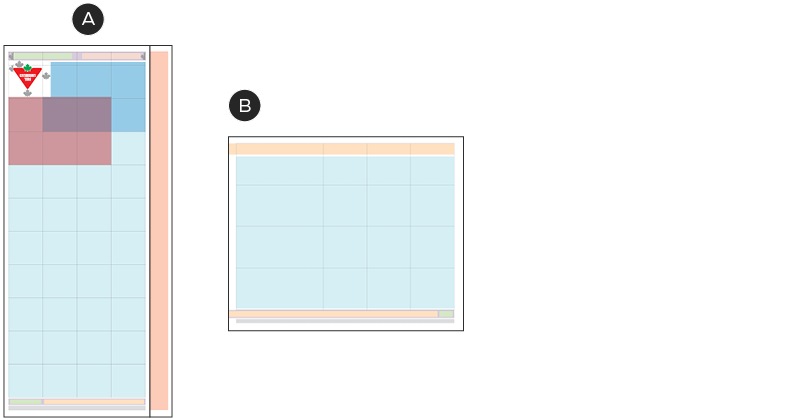
A – Pop-out zone on a Narrow Broad
B – Pop-out zone on a Square Tab
Pop-outs are special zones which we use commonly with Tier 3 and 4 Flyers. These zones run along one edge of the Flyer and help to draw attention to the deals which are featured on the page the pop-out zone is on.
Note: pop-out zones are not to be confused with the pop Flyer format. Pop-out zones refer only to the space which is visible when a pop Flyer (Standard or False) is positioned within the accompanying Tier 4 Flyer.
Pop Flyers commonly occur in addition to the regular Tier 4 Flyer pages and we often see them tucked in the centre fold of the Tier 4. In order for them to stand out from their Tier 4 counterpart, pop Flyers apply a different seasonal/campaign colour or Omni-identity.
A pop-out zone can be added to any Flyer, regardless its size, though the position of the pop-out zone changes based on how it will appear when tucked into its accompanying Flyer. There are two formats of pop flyers which have slight variations on how the pop-out zone is applied: Standard Pops and False Pops.
Standard Pop
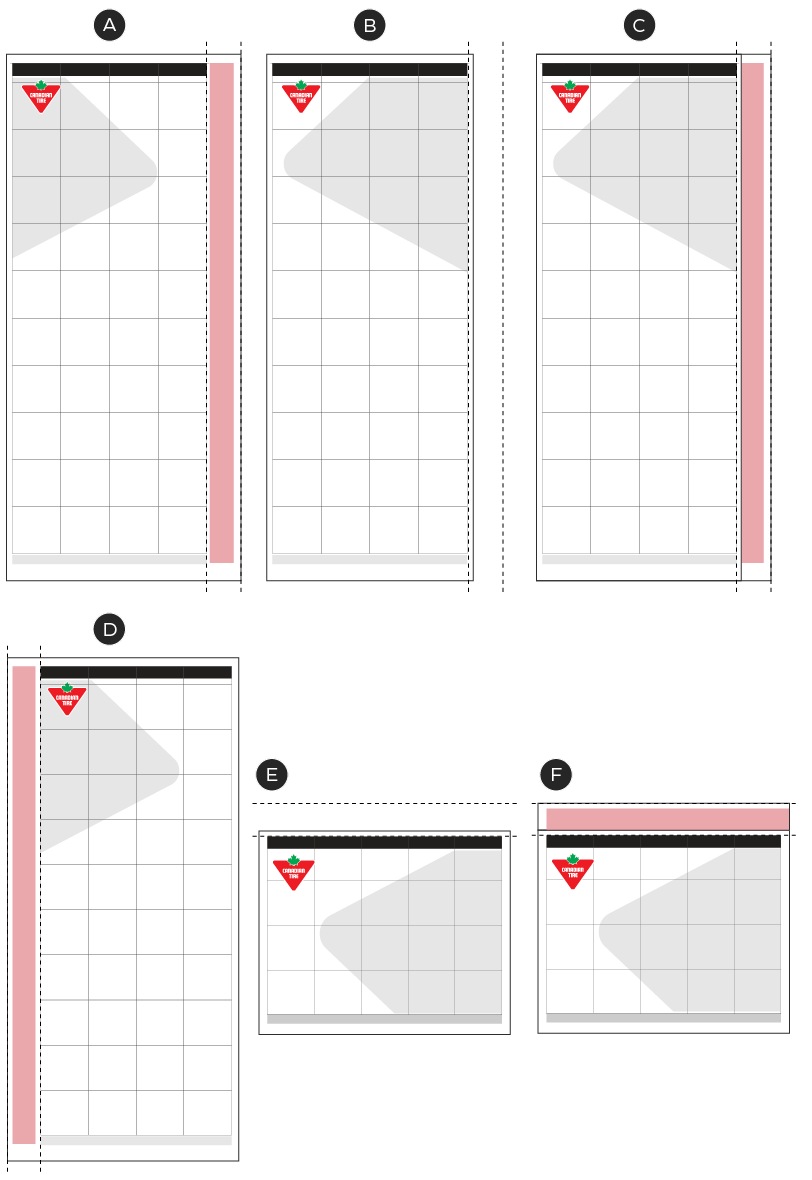
A – Standard tier 3 pop
B – Standard tier 4 Narrow Broad
C - Mockup of how a pop Flyer sits inside a Tier 4 flyer Narrow Broad
D – Standard tier 3 pop
E – Standard tier 4 Square Tab
F - Mockup of how a pop Flyer sits inside a Tier 4 Flyer Square Tab
Standard pop Flyers are designed on a page with additional width for the pop-out zone and positioned to stick out from the top or side of the the main Flyer so that customers can identify the special page(s). With the additional width added to the page, the Flyer grid does not change and the pop-out zone is added to exist outside of it.
False Pop
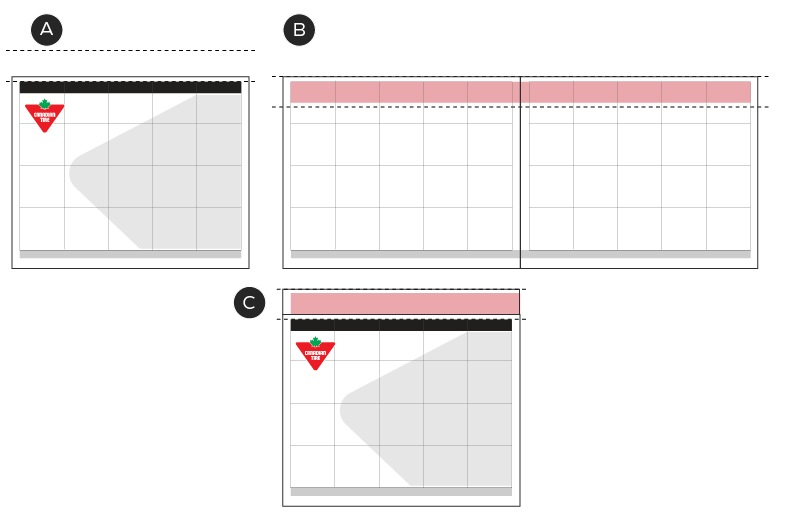
A – Standard tier 4 false pop
B – Standard tier 4 Narrow Broad
C - Mockup of how a False Pop Flyer sits inside a Tier 4 Flyer—offset to be visible at the top of the Tier 4 Flyer
Pop-out zones can also be added to standard sized Flyer pages when required. This page lacks the additional width/height commonly used in the square tab format, so the pop-out zone sits within the top row of the Flyer grid. This format of page is known as a False Pop or False Pull Out. In order to achieve the same presence as a standard Pop Flyer, False Pop flyer pages are offset when placed into the Flyer so that the pop zone is still visible above the other Flyer pages.
Construction
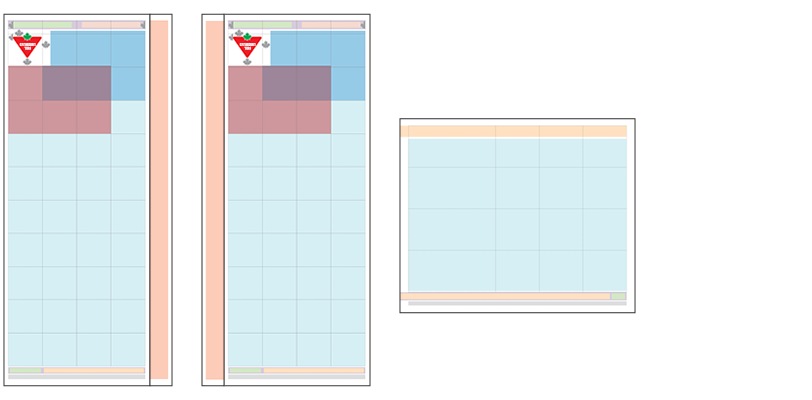
Pop-out zones can run up either side or across the top of a page (depending on the format). Regardless of the positioning of the pop-out zone, the content should be placed to be read properly when the pop Flyer is folded and assembled within the accompanying Flyer. When appearing vertically when tucked into a Flyer, the pop-out zone content should read top to bottom.

A - 3pt margins on all sides
B - Fold/centre point of zone with 3pt margin on either side
B - Lockup in the pop-out zone must reflect the same type styling as on the front cover
Pop-out zones should fit within the pages margins and can contain a fill colour or remain unfilled. The content within this zone should reflect the lockup or Brand Signature on the front cover of the pop Flyer. The lockup/Brand Signature must be fully contained within the pop-out zone and maintain a minimum margin of 3pt on all sides, including on either side of the centre fold line. As these Flyers are folded and only half the zone is visible when positioned within its accompanying Flyer, the content within the pop-out zone must be repeated and should be centred both horizontally and vertically.
Wrap
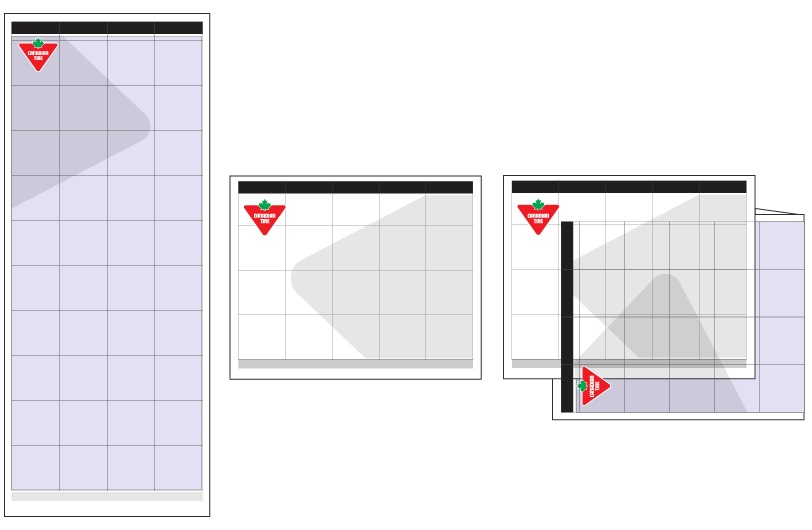
Wraps are a Flyer format which is named for how they they are positioned with the main Flyer. Wraps are commonly used during Tier 1A, 1B, 2C and 3 events when we utilize two separate Flyers or events in a single week. Wraps are additional Flyer pages that wrap around the front and back covers of a main Flyer to allow for additional product space/messaging.
The format can be applied to any tier of Flyer, can come in half- or full-page formats, but are NOT adhered to the main Flyer. The wrap format has no unique zones and should follow all standard flyer guidelines. When designing a wrap, ensure that there is sufficient contrast between it and the main Flyer to ensure customers can identify the two formats as separate entities.
Flaps
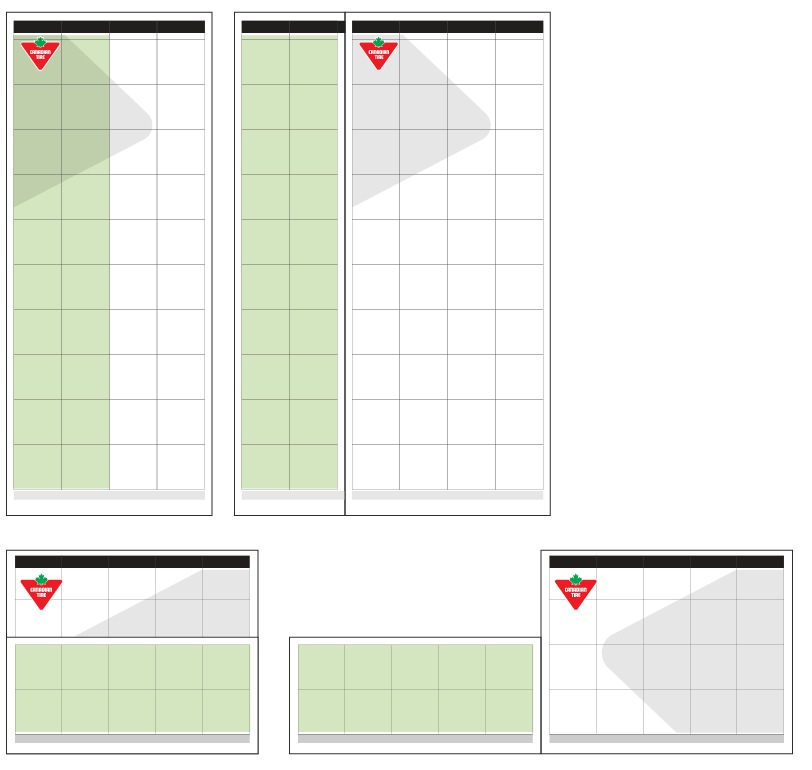
Flaps are an additional page which are bound to the main Flyer and cover a portion of the front cover. These special pages can appear on any size and tier of Flyer but are most commonly seen during our Tier 1A Big Red events. They are half page, double-sided additions that allow for additional product and messaging space. In the Narrow Broad format, the flap runs vertically down the left side of the page. Square Tab flaps are also bound to the seam of the Flyer but run horizontally and cover the lower half of the Flyer front cover.
Construction
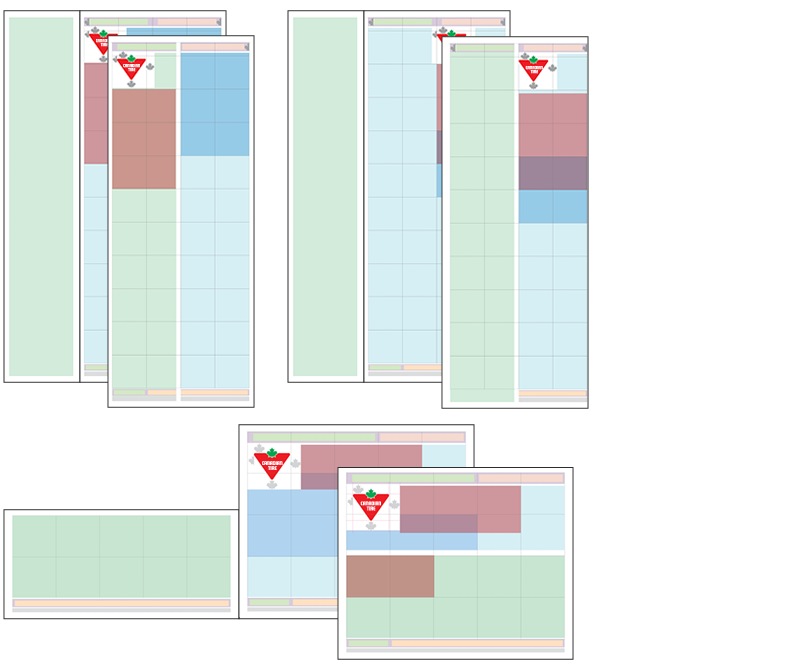
Though flaps are all fundamentally the same, there are some differences between those which appear on Narrow Broad and those that appear on Square Tab Flyers. All flaps follow all the same grid and margin specs that appear on the main Flyer they are attached to. Flaps can contain any of the following zones: header, footer, legal, logo, lockup, NPP/messaging, product slots or Deal Zones. The breakdown of the zones on a flap are flexible and determined by the Promotional team, but must always anchor the logo and lockup (if applicable) in the top left. For more information on the placement of the logo and lockups, please see the Logo, lockups and Triangle placement page.
Narrow Broad flaps
Flaps that appear on Narrow Broad Flyers run vertically from top to bottom. They can bleed on the right edge to create a seamless appearance with the Flyer front cover or be contained within the margins of the flap. If a logo and/or lockup is positioned on a flap, it must appear fully contained within the space and not bleed over the edge. The logo and/or lockup can appear on both the flap and cover in the same position for seamless integration when closed or can shift and appear in the two right side columns so they are visible when the flap is closed. In this instance, the logo and lockup would not repeat on the Flyer.
Narrow Broad flaps also contain partial headers and footers. These two zones must reflect the identical zone which appears on the front cover beneath the flap.
Square Tab Flaps
Square Tab flaps are also bound to the seam of the Flyer but run horizontally and cover the lower half of the Flyer front cover. In these versions, the logo and lockup/Brand Signature remains visible and does not get repeated on the flap. When applicable, the lockup zone for a Square Tab flap should still appear in the top left of the available space.
Footer and legal zones which appear these flaps are fully contained and may either repeat the same information as the basebar on the Flyer front cover or may have a unique message.