

Print Save Stories
Save Stories follow an Omni-Channel Design System to create consistency across all channels. That system is the foundation upon which the Print channel Save Stories are based off of. To read more about the Omni-Channel Save Story system, see the Save Story page. The majority of the Omni Guidelines apply to the Print channel, with the exception of a few instances where channel limitations require additional or alternative treatments.
Limited space savings banners
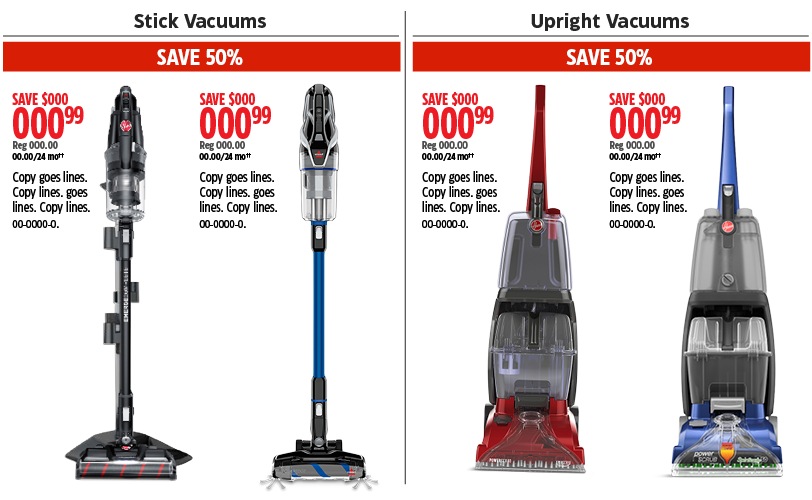
Due to the space limitations faced by the Print channel, some slots and styles of Save Stories must be applied in ways that reduce their footprint, but maintain their presence. In these instances, the High-Urgency Savings Circles can be applied to a slot as a Savings Banner.
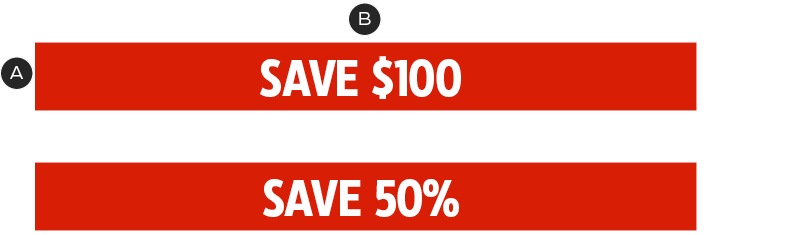
A – Banner Bar: CT Red, variable width
B – Headline Save Story—see build specs here.
The Savings Banner Save Story copy must follow the Headline Save Story formatting outlined in the Omni Guidelines. The Banner has variable width and must appear in CT Red. The Limited Space Savings Banners are commonly used in slots with multiple Save Stories and replace the Primary Save Story. For more information on Product Slots with multiple Save Stories, see the Product Slot page.
Multiple high-urgency savings circles
High-Priority Savings Circles are used to call attention to deals within a category of products or more than one product in a series; or to highlight the top savings on a page. The High-Priority Savings Circles application is consistent across all channels. For more information on High-Urgency Savings Circles, see the Omni-Channel Save Stories page.
Certain tiers of Flyers may occasionally utilize more than the standard amount of Saving Circles. Due to the nature of the various Product Slot layouts and Flyer formats, going beyond the standard number of Saving Circles highlights the inconsistencies in the positions of the Save Stories and creates busy layouts.
To manage this issue, the Print channel should adjust the Product Slot layout slightly to prioritize the organization and alignment of the High-Urgency Savings Circles.
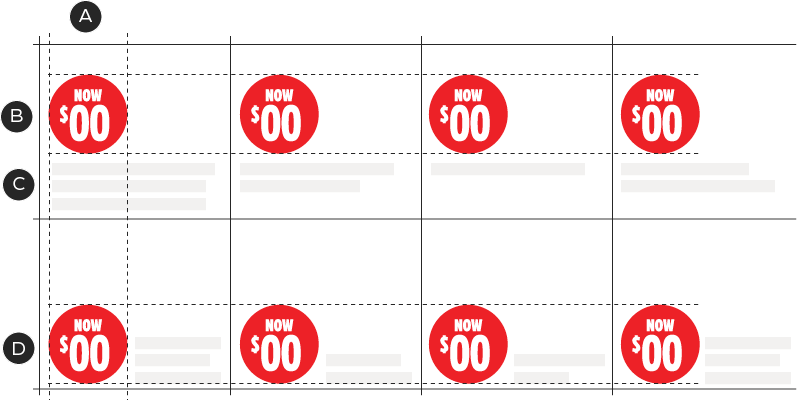
A & B – Be mindful of the alignment of the Savings Circles both vertically and horizontally
C – The positioning of the product copy will have to adjust to remain close to the Save story. This will result in some instances where there are gaps between the bottom of the product copy and the bottom of the slot.
D - The position of the Savings Circle can be above or beside the product copy. Consider the amount of copy that will need to be accommodated in the nearby slots when selecting the slot layout.
The positioning of Savings Circles is flexible and should be selected with the amount of product copy in nearby slots in mind. The consistent placement of the Savings Circles can create gaps underneath product copy between its last line of text and the bottom of the slot. When possible, avoid creating too much dead space in slots by selecting the most space efficient layout.